
Results
Total cooking time: –
Recommended internal temperature: –
Cooking schedule: –
This tool provides approximate times for home cooking. Always use a food thermometer and follow local food safety guidelines. Actual times vary by oven, pan, starting temperature and meat cut.
🥩 Overview
If your roast is always “done early” or “still raw in the middle,” the issue is usually the rate you’re using (minutes per kg/lb) or the unit you’re applying it to.
This page is built around the same logic you see in the calculator: weight × minutes-per-unit, plus practical adjustments for doneness and oven behavior. Use it to pick a sensible starting rate, avoid unit traps, and interpret the cooking schedule so you’re not guessing at the last minute.
What the results mean: “Total cooking time” is the estimated heat-on time. The “Cooking schedule” becomes most useful in Advanced mode because it works backward from your serving time and adds resting time.
📐 Formula & Methodology (what actually gets multiplied)
The core calculation
The estimator uses one primary rule and then applies small logic tweaks for certain situations.
Total cooking time (minutes) = Weight × Minutes per unit
Minutes per unit means exactly what it says: minutes per 1 kg or minutes per 1 lb. If you change the unit selector, make sure the minutes-per-unit value still matches that unit.
Quick reference table: typical starting rates (not guarantees)
These are common starting points for home cooking when you don’t have a recipe-specific rule. Real cook time can drift due to thickness, bone, stuffing, pan type, and starting temperature.
| Meat & typical cut | Roast (oven) starter rate | Why this rate shifts |
|---|---|---|
| Whole chicken | ~45 min/kg (≈20 min/lb) | Stuffing + uneven thickness can push time up |
| Whole turkey | ~40 min/kg (≈18 min/lb) | Large birds can lag in the center; start checking early |
| Pork roast | ~45 min/kg (≈20 min/lb) | Bone-in often needs the higher end of the range |
| Lamb leg/shoulder | ~40 min/kg (≈18 min/lb) | Doneness choice matters more than weight at the end |
| Beef roast/joint | ~35 min/kg (≈16 min/lb) for medium | Carryover cooking during rest can finish the center |
Doneness logic (beef & lamb)
For beef and lamb, the doneness selector applies a multiplier around the baseline (medium). That’s why two roasts with the same weight can show different times even if the minutes-per-unit preset stays similar.
- Rare → shorter because the target center temperature is lower.
- Well done → longer because the center must climb higher.
Advanced adjustments: convection and “oven runs hot/cool”
Advanced mode adds small, controlled adjustments. They are intentionally modest because the only “truth” is your thermometer reading.
- Fan / convection typically cooks faster, so the estimator trims time.
- Runs hot / cool nudges the estimate by a small percentage and widens the range so you know when to start checking.
Internal temperature targets (how to interpret “safe” vs “doneness”)
The temperature line is the decision tool. Time tells you when to check; temperature tells you when to stop.
| Meat | Typical safe minimum target | What changes the number |
|---|---|---|
| Poultry (chicken, turkey, duck) | ~75°C / 165°F | Dark meat may tolerate higher; safety target stays similar |
| Pork | ~71°C / 160°F | Ground pork needs strict targets; whole cuts vary by guidance |
| Beef / lamb (medium reference) | ~63°C / 145°F | Rare/medium/well are doneness choices, not a single “time rule” |
Where to probe (small placement errors cause big temperature errors)
Measure at the thickest part, away from bone, large fat pockets, and the pan. For whole birds, check both the deepest breast area and the thigh; use the lower reading as your safety check.
🧮 Practical examples (real numbers you can sanity-check)
Example 1: 2.5 kg whole chicken (roast)
Assume: 45 min/kg. Calculation: 2.5 × 45 = 112.5 minutes ≈ 1 hr 53 min.
Interpretation: Start checking internal temperature near the low end of the range; if the breast hits target early, rest time can finish the center without drying it out.
Example 2: 4.0 kg turkey for a fixed serving time
Assume: 40 min/kg. Calculation: 4.0 × 40 = 160 minutes = 2 hr 40 min.
Interpretation: In Advanced mode, the schedule adds your chosen rest minutes and works backward from “Serve at 19:00,” giving you a “start cooking” time you can actually follow.
Example 3: 1.8 kg beef roast (medium reference)
Assume: 35 min/kg. Calculation: 1.8 × 35 = 63 minutes ≈ 1 hr 03 min.
Interpretation: Expect carryover cooking: the center can rise during rest. If you pull exactly at target temperature, resting can push it closer to the next doneness band.
Example 4: Recipe rule conversion (common math trap)
Your recipe says “20 minutes per 500 g.” That equals 40 minutes per kg because 500 g is half a kilogram.
Logic check: If you entered “20” as minutes per kg, you’d cut the time in half and likely undercook the center.
📊 Infographic & visual guide: the timing timeline (start → check → rest → serve)
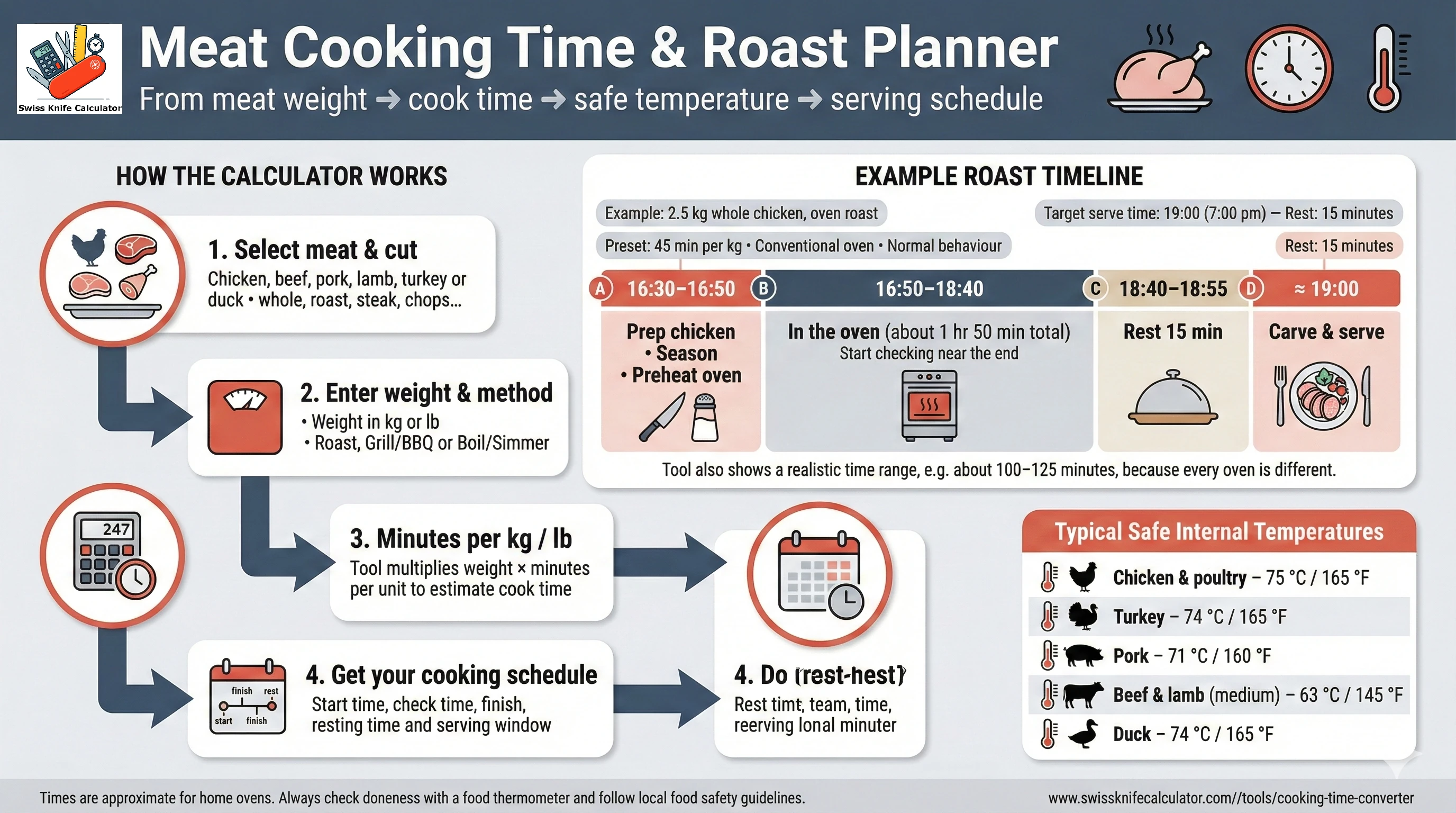
How to read the schedule line
- Start time is calculated by subtracting cook time (and rest time if you set it) from your target serving time.
- Check time is placed earlier than “finish” so you can confirm temperature before you’re late.
- Finish + rest matters most for beef and lamb because carryover cooking can move the doneness result.
🔥 Use cases + logic tips (what to change when reality differs)
Use cases
- Holiday timing: plan a turkey or lamb leg so resting time doesn’t collide with side dishes.
- Scaling up: estimate how cook time changes when you go from a 1.5 kg chicken to a 2.5 kg chicken using the same minutes-per-unit rule.
- Recipe calibration: adjust your minutes per kg/lb after two or three runs until your oven + pan combo is predictable.
Common math/logic mistakes (and how to fix them)
- Unit mismatch: using a “per kg” rate with a weight in pounds (or vice versa). Fix: re-enter the rate for the chosen unit or use the preset refill.
- Recipe rule confusion: “per 500 g” or “per 100 g” must be scaled to “per 1 kg.” Fix: convert to minutes per kg before entering.
- Wrong driver for steaks: using weight for steaks instead of thickness. Fix: use thickness when available because center distance, not mass, controls heating.
- Ignoring carryover: pulling at the final target and still resting for 20 minutes. Fix: for beef/lamb, consider pulling slightly early and letting rest finish the rise.
Assumptions & limits (why your result may drift)
- Shape matters: a long, thin roast cooks faster than a compact, thick one at the same weight.
- Starting temperature matters: fridge-cold meat takes longer to reach the same center temperature than room-temp meat.
- Method differences: boiling/simmering varies with pot size, lid use, and whether you maintain a true simmer.
- Safety authority differences: temperature targets can vary by local guidance; use the tool as a planning helper, not as official instruction.
❓ Frequently Asked Questions (FAQ)
Why does switching kg ↔ lb change the minutes-per-unit number?
Because the rate is “minutes per unit.” If your recipe says 20 minutes per pound, that is not the same as 20 minutes per kilogram. When you switch units, keep the rate consistent with the new unit (or let the preset refill) so the time estimate stays logically correct.
How do I convert a recipe rule into minutes per kg or minutes per lb?
Translate the rule into “minutes per 1 unit.” Example: 20 minutes per 500 g equals 40 minutes per kg. Example: 25 minutes per 1 lb equals 25 minutes per lb. Enter that value in the “Minutes per kg / lb” field to mirror your recipe.
Does the total time include resting time?
No. The total cooking time is the heat-on time estimate. Resting time is added only in the serving schedule (Advanced mode) so you can plan when to finish cooking and when to carve.
What’s the biggest mistake when overriding minutes per kg / lb?
Mixing a “per kg” rate with a weight in pounds (or vice versa). That effectively multiplies by the wrong unit and can be off by about 2.2×. If you change units, either re-enter the rate for that unit or use the preset.
Why can a thicker steak take longer even if it weighs the same?
Heat has to travel to the center. Two steaks can weigh the same, but the thicker one has a longer distance from surface to center, so it needs more time. That’s why the optional thickness input can be more reliable for steaks and chops than weight alone.
How should I adjust for bone-in roasts or stuffed poultry?
Bone and stuffing change heat flow and often slow the center. A practical adjustment is to use the higher end of the time range or increase the minutes-per-unit by 5–10% and start temperature checks earlier. Always verify with an internal thermometer reading.
Where exactly should I measure internal temperature?
Measure at the thickest part of the meat, avoiding bone, large fat pockets, and the pan. For whole birds, check the deepest part of the breast and the thigh. Use the temperature target as the decision point, not the clock.
What is carryover cooking and how does it affect timing?
Carryover cooking is the rise in internal temperature after you remove meat from heat. Larger roasts can climb several degrees during rest. If you target a specific doneness for beef or lamb, consider pulling slightly early and letting the rest bring it to the final temperature.
Are grill times always shorter than oven roast times?
Often, but not always. Direct heat can cook faster, but thick cuts still need time for the center to heat. Use the grill presets as a starting point and rely on internal temperature for the final call.
Can I cook meat directly from frozen using this estimator?
Not recommended. Frozen meat heats unevenly and timing becomes unreliable. Thaw safely first, then use this calculator to estimate the cooking window and confirm doneness by internal temperature.
Food safety disclaimer: Times and temperatures are estimates for planning and learning. Real results vary by meat shape, starting temperature, and equipment. Use a food thermometer and follow local food safety guidance.
Last Verified: December 2025